For teachers
About Pseudly
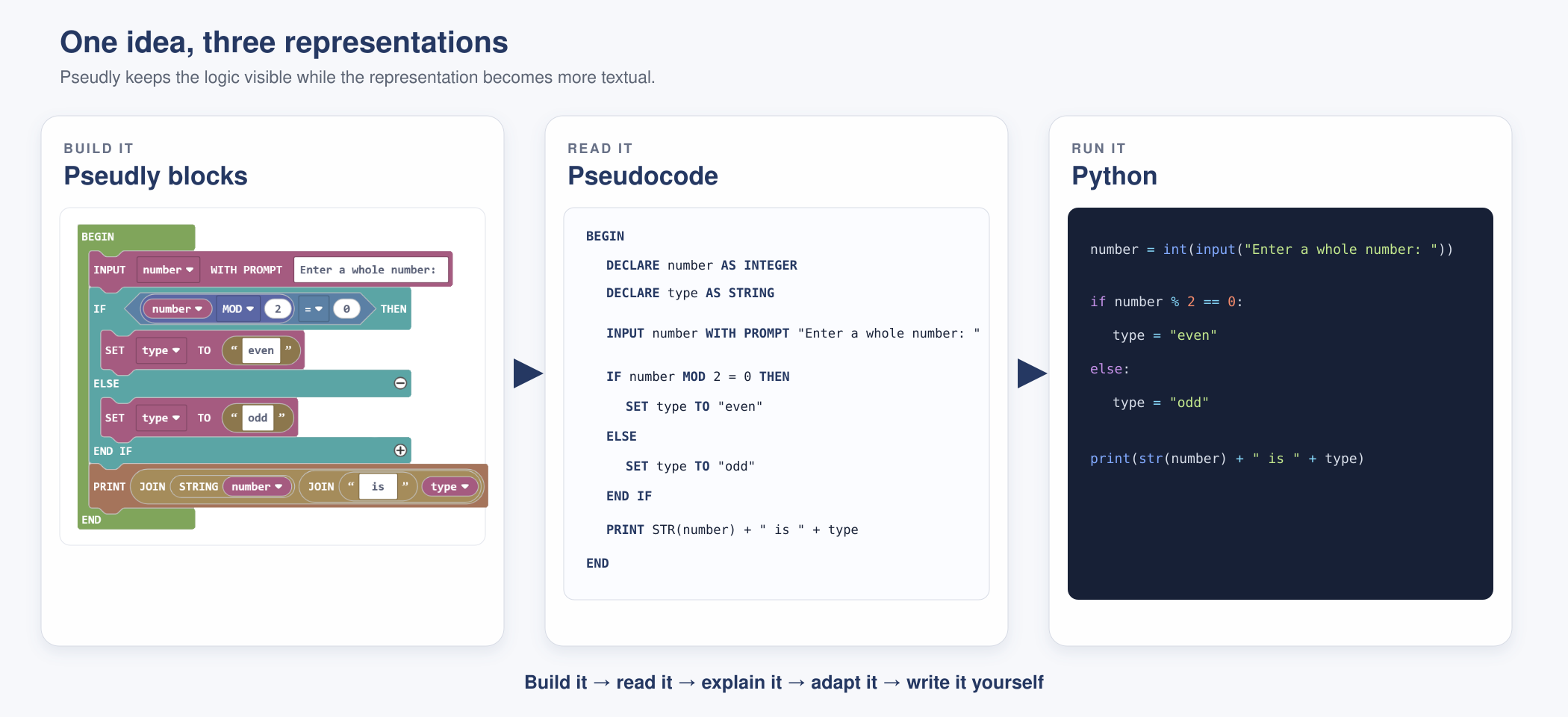
Pseudly is a block-based environment that helps students construct algorithms and see them expressed immediately as consistently formatted pseudocode. Put simply, it is intended to be a bridge between visual programming environments such as Scratch and text-based languages such as Python.
Why Pseudly?
There were two starting points for Pseudly. The first was curricular. Pseudocode now has a clear place across Years 7–10 in the Australian Curriculum: Digital Technologies, and it is expected in senior Digital Solutions assessment in Queensland. In general, Digital Technologies is not a prerequisite from one year to the next. Teachers therefore need to be able to introduce pseudocode afresh at several year levels, at different depths and for different purposes, while still treating it as one reasonably consistent way of expressing an algorithm.
That repeated exposure is valuable. A student who continues into Digital Solutions should not be meeting pseudocode for the first time when it becomes part of an assessment. Equally, students who do not continue into senior computing can still learn to organise a solution using sequence, selection, iteration and modularisation.
The second starting point came directly from the experience of teaching programming to an entire Year 7 cohort with a very wide range of experience and confidence. For several years now, the local course here has used a simple Scratch game to teach algorithms and coding. In it, the protagonist moves around the stage, collects items and eventually has to avoid an enemy. It is an uncomplicated idea, but it provides plenty of room to teach sequence, decisions, loops, variables, movement, sound and the way several small behaviours combine to make a program.
During the COVID lockdowns and amid the need for remote learning, the Year 7 programming unit was switched from Scratch to Python. Python was easier to demonstrate through videos and online materials, but many students were not yet ready for the extra abstraction and complexity. The difficulty was not always the underlying idea. Often, it was the exact spelling, punctuation, indentation and structure required before the computer would do anything at all. An error message could bring a student to a complete stop even when the intended algorithm was quite sensible.
When the unit returned to Scratch a few years later, student confidence and enjoyment returned as well. Blocks fit together or they do not. Students can still create faulty logic (and that is important) but a misplaced colon or bracket does not prevent them from exploring the solution.
How does Pseudly support learning?
Pseudly begins with a main program contained by BEGIN and END. From there, students can work with the familiar ideas of sequence, selection, iteration, variables and, as their programs develop, modularisation through procedures and functions.
The toolbox is organised around the way teachers need to talk about programs in class:
- Code blocks structure the program: statements, decisions, loops, variables and subprograms.
- Data supply or produce values: Boolean conditions, numbers, strings, lists, and date and time values.
- Extensions apply the same core ideas in a particular context, including micro:bit, Micromelon robots, simple SQL and game development.
This grouping is more than toolbox housekeeping. It helps students distinguish between a block that controls what happens and a block that supplies data to it. It also gives teachers a shared vocabulary and makes it practical to build a lesson around one idea without first introducing an entire programming language.
The balance between blocks and text can change with the learner. A younger or less experienced class might work mainly with the blocks while beginning to recognise the pseudocode beside them. From about Year 8 onwards, teachers can increasingly tell students that the blocks are useful scaffolding, but the pseudocode is the more interesting part. The aim is not permanent dependence on the blocks; it is a gradual shift towards reading, explaining, adapting and eventually writing algorithms independently.
Pseudly also needs to work as an ordinary classroom tool. Programs can be saved and reloaded using a versioned JSON file. The pseudocode can be copied or downloaded as text, and the block workspace can be exported as a PNG. A teacher can therefore prepare a worked example showing both representations, place the image in OneNote or another LMS, or ask students to submit the blocks alongside the resulting pseudocode.
The construction process remains visible. Pseudly does not simply hand a student a finished algorithm: the student still has to choose, order and connect the ideas that make it work.
Why does Pseudly works this way?
Familiarity and simplicity have guided the visual design. Pseudly uses Blockly's Zelos renderer because its rounded, colourful blocks are recognisable to students who have already used Scratch. The less time spent explaining the interface, the sooner classes can discuss the algorithm.
The generated pseudocode is deliberately consistent. There is no single universal pseudocode language, and Pseudly does not claim to provide the only correct form. It provides one coherent classroom convention that students can learn to read and teachers can refer to consistently. It also insists on using plain ASCII characters, so moving the text from one student (or one computer) to another is trivial.
Structural words such as BEGIN, END, IF, ELSE, WHILE and RETURN are capitalised. That makes the shape of an algorithm easier to scan. Around those signposts, Pseudly tries to keep each instruction as close to plain English as it can reasonably be. The result should be precise enough to describe an algorithm without turning into disguised code from an actual language or a page full of programming punctuation.
There is a balance here. Capitalised words make the underlying structures visible; English-like phrasing keeps the algorithm readable. Pseudly is still developing as more people use it. The development team is always looking for the awkward edges and to discover better ways to explain things. It is not intended to replace Scratch, a real coding language, or students writing pseudocode for themselves. Its job is smaller and, we think, useful: to make the transition between those forms more manageable, and to let students concentrate on computational thinking before syntax becomes the main event.