
Computational Thinking
How do you turn a problem into an algorithm you can explain and trust? Computational thinking helps you decide what the solution must do, organise its steps and check whether it meets the requirements. Pseudly makes those decisions visible in blocks and pseudocode.
New to the editor? Start with Getting started with Pseudly. This page uses a score-classification problem to explore how to plan and check a solution.
Start with the problem
Suppose each valid score of 50 or more should produce Pass, and each valid score below 50 should produce Fail. Before choosing blocks, identify the input, the rule and the required outputs. Here, the input is a score and the decision is score >= 50. Also decide what counts as a valid score and what should happen when the input is invalid. Those requirements give you something to test against.
Break it into manageable parts
Decomposition means splitting the job into pieces you can reason about: obtain a score, check it, decide the result and report it. If the same job is needed several times, give it a subprogram with a clear name, parameters and, where appropriate, a return value.
Keep the details that matter
Abstraction means choosing a useful model. A variable named score represents the information the decision needs. The student’s favourite colour is irrelevant to this rule. A pass threshold of 50 matters and should be explicit. Explain the assumptions your model makes, such as whether scores must lie between 0 and 100.
Make the rule visible
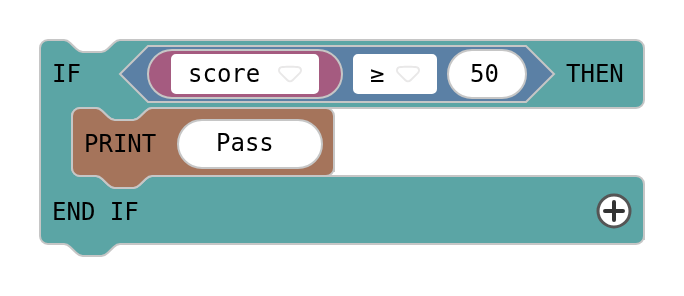
IF score >= 50 THEN
    PRINT "Pass"
END IF
The PRINT is inside the IF, so it runs only when the condition is true. A score of 49 prints nothing in this fragment. If the problem requires Fail as well, the fragment is incomplete: add an ELSE branch. Correct block connections do not guarantee a complete solution.
Look for a pattern
If you must classify thirty scores, the same decision is repeated for each one. That suggests iteration rather than thirty copied IF blocks. If several parts of a program classify scores, a function could return the classification so the rule has one home.
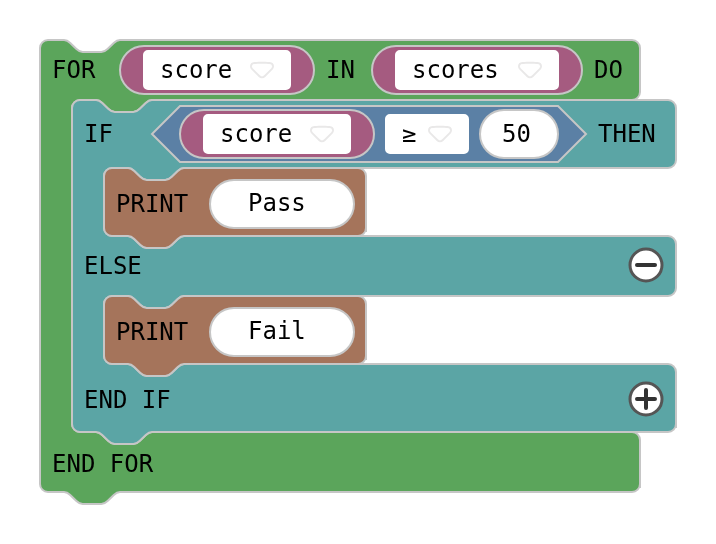
FOR score IN scores DO
    IF score >= 50 THEN
        PRINT "Pass"
    ELSE
        PRINT "Fail"
    END IF
END FOR
The complete authoring example supplies scores of 49, 50 and 51. The loop visits each score, and the IF chooses which result to print. Decide how a real program would obtain its scores and handle invalid values. A tidy loop does not settle those requirements.
Check the algorithm
| Score | Expected output | Reason |
|---|---|---|
| 49 | Fail | Below the threshold |
| 50 | Pass | Exactly at the threshold |
| 51 | Pass | Above the threshold |
Desk check the complete algorithm: work through its instructions by hand for each score and record what it would print. Compare that with the expected output above. The incomplete IF fragment prints nothing for 49; the version with ELSE should print Fail, Pass and Pass for 49, 50 and 51.
If the requirement is to accept scores from 0 to 100 inclusive, also check 0 and 100, then consider a negative score and a score over 100. The illustrated algorithm does not validate that range. Decide how invalid scores should be handled before adding the necessary checks. For a list of scores, also decide whether an empty list should produce no output or a message.
Testing can reveal a missing requirement as well as a wrong condition. Update the solution, then explain why the change is needed.
Move towards independence
Build the blocks, read the pseudocode and explain the decisions. Then hide the generated text and write the same algorithm yourself. Later, implement it in Python or another language and compare the structures. The goal is to choose, justify and adapt the algorithm without depending on the interface to make every decision for you.
Use a blank manual tracing worksheet for predictions, then compare with Inspect → Desk check. Automatic records and probes show completed recording points, rather than every instruction. Explain differences rather than copying the generated table. Inspecting Programs explains the tools.